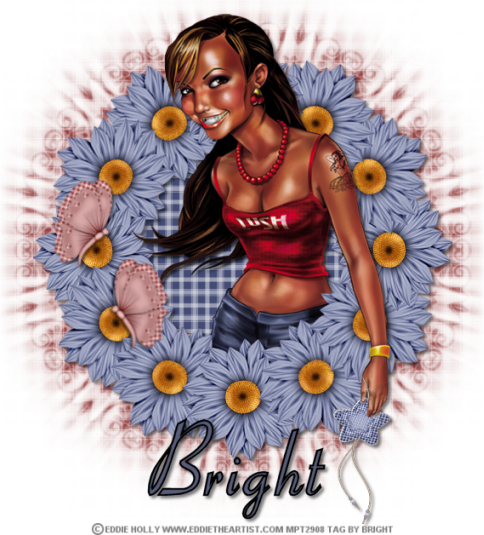
Charmed

Tube of choice i used Eddie Holly
you need a licence to use this art
you can purchase one HERE.
Ftu mini kit Country charm HERE.Thanks Lynn
Chasmask9 HERE.Thanks Chas
Mura Meister Copies plugin HERE.
Font of choice i used Aspire.
Open a new image 700x700 fill with white
New layer fill with paper of choice
Mask new from image select and apply mask merge mask layer visable.
Resize charm4 by 45 twice then by 75 twice paste as new layer
Mura Meister copies on these settings
Encircle change number to6 all other setting as default.
Magic wand click in centre of flower ring
selections modify exspand by5
paste paper of choice selections invert
delete on keyboard drag below frame select none
drop shaddow frame.
Activate frame layer magic wand click in centre of frame
selections modify exspand by5
open tube of choice paste as new layer drop shaddow
selections delete on keyboard select none.
Paste tube again drag above frame layer drop shaddow
use selection tool to cut off bottom of tube leaving her arm on top.
Resize star pendant paste as new layer on top of tube hand
drop shaddow erase part to show her fingers like she is holding the pendant.
Resize butterfly paste as new layer on top of left of flowers drop shaddow
rotate slightly duplicate place under top butterfly
Image mirror rotate slightly.
Add name i used Aspire font place to bottom of frame drop shaddow.
Add url copywrite and watermark merge other layers visable.
Save as PNG.
Hope you enjoyed doing my tut, thanks for trying it.
************

Christmas in July

Tube of choice i used Barbara Jensen
free tube offer HERE.
You need a licence to use this art even though it is free.
FTU kit Christmas in July HERE.Thanks Ali for sharing
Montiblindsmask HERE.
Font of choice i used brush script.
Open a new image700x700 fill with white
New layer fill with paper of choice
mask new from image select and apply mask
merge mask layer visable.
Resize fireplace1 paste as new layer on top of mask
Resize merry christmas wordart of choice paste as new layer
place on the fireplace chimney drop shaddow.
Resize garland1 paste as new layer place on mantlepiece drop shaddow.
Resize bell1 paste as new layer place to right of fire dop shaddow.
Open tube of choice paste as new layer place to left of fireplace drop shaddow.
Resize presents2 paste as new layer place to bottom of tube drop shaddow.
duplicate image mirror place alongside other presents
use selection tool to cut away parts you don't want showingsee mine for details.
Resize tree of choice paste as new layer place to left of fireplace drop shaddow.
Resize nativity paste as new layer place at bottom of fireplace drop shaddow.
Resize ribbon1 paste as new layer image flip
place on top of presents drop shaddow.
Resize ribbon2 paste as new layer image flip
place on top of ribbon1 drop shaddow.
Resize holly paste as new layer place on top of presents drop shaddow.
Resize present1 paste as new layer place at bottomof tree drop shaddow.
Add wordart Christmas in July i used Kingthings christmas drop shaddow.
Add name i used Brush script and a paper for my fill drop shaddow.
Add url copywrite and watermark.
Resize crop close off white background merge other layers visable.
Save as PNG.
Hope you enjoyed doing my tut, thanks for trying it.
************

Lemon grass

Tube of choice i used Eddie Holly
you need a licence to use this art
you can purchase one HERE. FTU mini kit Lemon grass HERE.Thanks Lynn for sharing.
Zuzzanna mask7 HERE.Thanks Zuzzanna
Font of choice i used Algerian.
Open a new image 700x700 fill with white.
New layer fill with a colour to complimate tube
mask new from image select and apply mask
select none merge mask layer visable.
Resize double frame paste as new layer on top of mask
magic wand click centre of frame don't forget the small bits
selections modify exspand by5
new layer fill with colour to complimate your tube
selections invert delete on keyboard select none
drag below frame layer drop shaddow frame.
Resize grass blossom paste as new layer in left frame
used selection tool to cut overlapping parts drop shaddow
duplicate image mirror place in right frame.
Resize butterfly2 paste as new layer place near bottom of blossom
in left frame drop shaddow.
Resize butterfly1 paste as new layer place to top left
right framedrop shaddow.
Open tube of choice paste as new layer to centre of frame drop shaddow.
Resize heart pendant paste as new layer to left of frame drop shaddow.
Resize daisy paste as new layer place to top of pendant drop shaddow.
Resize brad1 paste as new layer place to top right of frame drop shaddow.
Resize brad2 paste as new layer on top of brad1 drop shaddow
duplicate brad1 place on top of brad2.
Add name place to bottom left of frame rotate drop shaddow.
Add url copywrite and watermark.
Resize crop close off white background merge other layers visable.
Save as PNG.
Hope you enjoyed doing my tut, thanks for trying it.
************