Carnival

Tube of choice i used FTU Ausposers HERE.Thanks Aus
FTU FM Madi Gras scrapkit HERE.Thankyou Sylvie
FTU Lace script frame HERE. Thankyou Cindy for sharing
Mask HERE.
Font of choice i used Morpheus Regular.
File new 600x650 fill with white.
New layer fill with paper of choice mask
new from image select and apply mask.
Resize frame32 paste as new layer place on top of mask.
Magic wand click in centre selections modify exspand by3
paste paper of choice selections invert
delete on keyboard select none drag below frame.
Resize tube of choice paste as new layer place
to bottom of frame drop shaddow use selection tool
cut overlapping parts drop shaddow frame.
Resize bytterfly61 paste as new layer place to top of tubes arm.
Resize mask21 paste as new layer place
to bottom right corner of frame drop shaddow rotate.
Resize Resize mask45 paste as new layer place
to top right corner of frame drop shaddow rotate.
Add name place to bottom of frame drop shaddow.
Add url copywrite and watermark.
Resize crop delete white background merge layers visable.
Save as PNG.
Hope you enjoyed doing my tut, thanks for trying it.
************

Blue noise

Image and video hosting by TinyPic
Tube of choice i used Pat Strupini.
You need a licence to use this art you can purchase one HERE.
FTU Silver shaddow frames and scrapkit HERE.
Deviantdesigner mask5 HERE.
Thankyou Lynn for both frames,kit and mask.
Font of choice i used Vivaldi.
File new 600x650 fill with white.
New layer fill colour to compliment tube and kit mask
new from image select and apply mask merge mask.
Resize frame2 paste as new layer on top of mask.
Magic wand click in centre selections modify exspand by5
New layer fill with colour of choice selections
invert delete on keyboard drag below frame select none.
I gave mine a weave effect.
Highlight frame selections modify exspand by2
Resize tube of choice paste as new layer place
towards right of frame select none.
Paste tube again drag above frame line it up
drop shaddow use selection tool cut off bottom of tube.
Resize fancy bow paste as new layer place to left of frame drop shaddow.
Resize box paste as new layer place to bottom centre
of frame drop shaddow.
Resize heart paste as new layer place under and
to left of box drop shaddow.
Resize heart ribbon paste as new layer place
on top right of box drop shaddow.
Resize pendant paste as new layer place to left
of frame drop shaddow.
Resize flower1 paste as new layer place on top of
pendant drop shaddow duplicate place under top left of 1st flower
duplicate place under right of 2nd flower.
Add name place on top of box dropshaddow.
Add url copywrite and watermark.
Resize crop highlight mask layer effects noise add noise on50
edit copy merged paste in animation shop as new layer.
Back to psp undo noise add noise on 60 edit copy merged
paste in animation shop after current frame.
Back to psp undo noise add noise on70 edit copy merged
paste in animation shop after current frame.
View animation save your work.
Hop eyou enjoyed doing my tut, thanks for trying it.
************

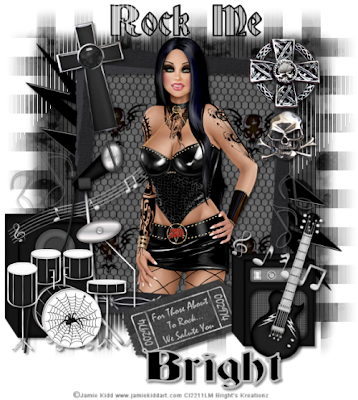
Black rock

Tube of choice i used Jamie Kidd.
You need a licence to use this art you can purchase one HERE.
PTU Back in black HERE.Thanks Vicki
Deviantdesigner mask4 HERE.Thankyou Lynn
Font of choice i used Deutsch Gothic.
File new 600x650 fill with white.
New layer fill with paper of choice mask
new from image select and apply mask merge mask visable.
I gave min tramages tow the line effect.
Resize frame 17 paste as new layer magic wand click in centre
selections modify exspand by5 paste paper of choice
selections invert delete on keyboard select none
drag below frame drop shaddow frame.
Highlight frame magic wand click in centre selections
modify exspand by2 resize tube of choice paste as new layer
selections invert delete on keyboard select none
Paste tube again on top of frame line it up with other one drop shaddow
Selection tool cut bottom of tube away.
Resize ele12 paste as new layer place on top of mask
left top of frame drop shaddow rotate flip duplicate place
to right bottom of frame.
Resize ele13 paste as new layer place to bottom
left corner of frame drop shaddow.
resize ele19 paste as new layer on top of ele13 drop shaddow
erase end on top of tube rotate.
Resize ele18 paste as new layer place on top ele13 drop shaddow
slightly rotate and lengthen with deformation tool sharpen.
Resize ele15 paste as new layer place on top ele13 drop shaddow.
Resize ele46 paste as new layer place on top ele15
drop shaddow rotate.
Resize 14 paste as new layer place on bottom right corner drop shaddow.
Resize ele16 paste as new layer place on top ele14 drop shaddow rotate.
Resize ele20 paste as new layer place on top ele16 rotate drop shaddow.
Resize ele25 paste as new layer place above ele14
drop shaddow rotate duplicate image mirror place
above other one duplicate image mirror place above
ele13 duplicate image mirror place above to right of last one.
Resize ele11 paste as new layer place right ele25 drop shaddow.
Resize ele65 paste as new layer place to top right
corner of frame drop shaddow.
Resize ele6 paste as new layer place to top left corner of frame
drop shaddow rotate.
Add wordart place to top of frame drop shaddow tow the line effect.
Add name place to bottom of elements dropshaddow.
Add url copywrite and watermark.
Resize crop delete white background layer merge layers visable.
Save as PNG.
Hope you enjoyed doing my tut, thanks for trying it.
************