Showing posts with label Birthdays. Show all posts

Happy Birthday 2016

 
Tube of choice i used Fiodorova_Maria.Birthday.
You need a licence to use this art, you can purchase one HERE.
FTU. Happy Birthday kit.Thanks Babs for sharing. HERE.
montiblindsmask.Thanks Monti for sharing. HERE.
Font of choice i used Janda Celebration Script.
Drop shaddow throughout. 2.2.50.5. Black.
File new 650 x 650. Fill with white.
Copy and paste Paper16.as new layer.Mask new from image.
Select and apply mask.Merge mask visable.Resize by120.
Resize Frame5. by60. Paste as new layer on top center of mask.
Magic wand, click blank spaces of frame, modify exspand by5.
Copy and paste Paper8.Invert hit delete, drag below frame.Select none.Drop shaddow frame.
Resize tube of choice by25. Paste as new layer on top center of frame.Sharpen, drop shaddow.
Resize Banner3. by25. Paste as new layer on top bottom center of tube, drop shaddow.
Resize Confetti2.by35.Paste as new layer on top right of frame.
Drop shaddow.Duplicate, image mirror.
Resize Deco1. by30. Paste as new layer on top bottom right of tag.
Drop shaddow.Duplicate, image mirror.
Resize Gift2. by20.Paste as new layer on top bottom left of frame.Drop shaddow.
Resize Gift3. by15.Paste as new layer on top bottom left of Gift2.
Drag below deco.Drop shaddow.
Resize Gifts2.by75.Paste as new layer on top left of frame.Drop shaddow.
Resize Gifts1.by35.Paste as new layer on top bottom right tag.Drop shaddow.
Resize Hat4.by25.Paste as new layer on top left of tube.
Rotate left slightly.Drop shaddow.
Add URL.Copyright and Licence number.
Add name on top center of mask.Rotate 90% Left.Drop shaddow.
Delete white background.Save as PNG.
Hope you enjoy doing my tut, thanks for trying it.

 
http://www.copyrighted.com/


My Birthday

Celebrated my 73rd.Birthday with my partner and my girls yesterday.
A good meal out and a good day had by all.


A couple of presents and a card.


My long term partner.
My granddaughter testing my new  spare bedroom makeover,tokk me 4 days to do.

Mandy again loving my bedroom makemover,this tokk me 3 days to do.
Needed a day of being spoilt after these makeovers.

Birthday wishes


Tube of choice i used Verymany.
You need a licence to use this art, you can purchase one HERE.
FTU Happy Birthday kit HERE. Thanks for sharing.
Mask HERE.
Word art HERE. Thanks for sharing.
Font of choice i used Cardinal Alternate.
File new 650x650 fill with white new layer fill paper of choice.
Mask select and apply merge mask visable.
Resize tube of choice paste as new layer place on top left
of mask drop shaddow.
Resize limo paste as new layer place on top bottom right of tube drop shaddow.
Add oxo on top of number plate.
Resize present1 paste as new layer on top bottom left of tube.
Resize cake2 paste as new layer place on top bottom 
of present drop shaddow.
Resize present4 image mirror paste as new layer place behins cake drop shaddow.
Resize champagne paste as new layer place on top bottom
of cake drop shaddow.
Resize glass and pearls paste as new layer place on top bottom
of champagne drop shaddow.
Resize lips2 paste as new layer place below center of limo drop shaddow.
Resize wordart paste as new layer place top right of tube drop shaddow.
Resize stars paste as new layer place bottom right on top
of mask drop shaddow  erase any you do not want showing. Crop if needed.
Add url copyright and licence number.
Add name place beneath lips drop shaddow.
Delete white back ground save as PNG.
Hope you enjoyed doing my tut, thanks for trying it.

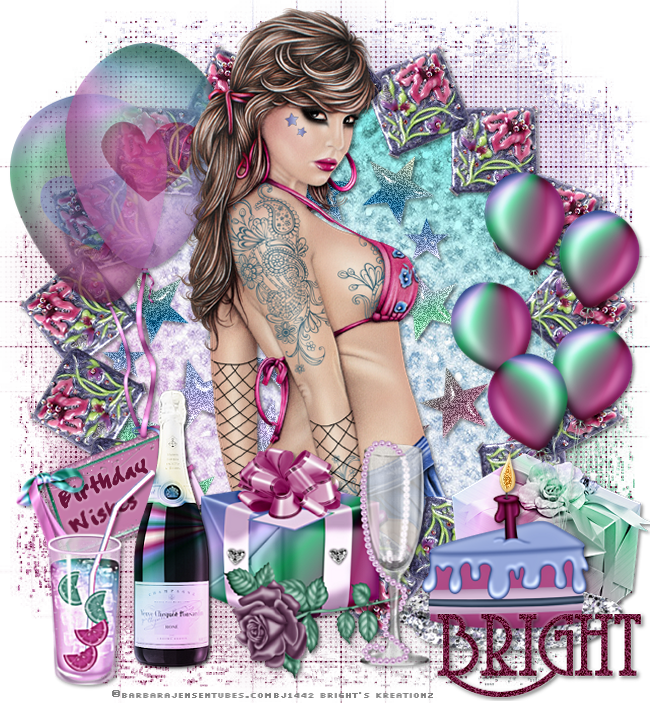
Birthday Girl

Tube of choice,i used Barbara Jensen.
You need a licence to use this art, you can purchase one HERE.Package29.
FTU Happy Birthday scrap kit HERE.Thank you for sharing.
Mask167 HERE.Thanks for sharing.
Wordart font crappyJoe size24.
Font for name  Coventry Garden NF size55.
Plugin.
dsb Bright noise set on 50.
Eye candy gradient glow.
File new 650x750 crop later. Fill with white,new layer
Fill with paper5 mask new from image,select and apply mask
merge mask visable duplicate merge visable again.
Add psp weave effect in purple.
Open frame2 edit copy and paste as a new layer
on top center of mask.
Magic wand click in center of frame selections
modify exspand by5 resize paper2 paste as new layer
selections invert delete on keyboard, drag below frame.
Resize stars paste as new layer delete on keyboard select none.
Drop shaddow stars and frame.
Resize balloons3 paste as new layer place top left
on frame drop shaddow.
Add wordart i used birthday wishes text size24 crappyJoe font
add eyecandy gradient glow in white.
Resize bow1 paste as new layer place on top left corner
of balloons 3 drop shaddow.
Highlight frame magic wand click in center selections
modify exspand by5 resize tube of choice invert delete on keyboard.
select none. paste tube again on top of 1st tube drop shaddow
erase bottom of top tube.
Resize present4 image mirror paste as new layer place
to bottom right of mask drop shaddow.
Resize cake2 paste as new layer place on top bottom left
of present4 drop shaddow. Use point to point tool
draw around yellow flame add bright noise.
Resize glass and pearls paste as new layer place left
of  cake drop shaddow.
Resize present1 paste as new layer place left of glass
drag below glass drop shaddow.
Resize champagne paste as new layer place on top left
of present drop shaddow duplicate.
Resize cocktail2 paste as new layer place left of champagne drop shaddow.
Crop 650 pixel width all layers ticked.
Add url copyright and watermark.
Add name i used Coventry Garden NF text size55.
Add bright noise, Add gradient glow then normal drop shaddow.
Delete white background save as PNG.
Hope you enjoyed doing my tut, thanks for trying it.

Birthday Wishes

Tube of choice i used Jennifer Janesko.
You need a licence to use this art, you can purchase one HERE.
PTU Sweet Plum scrap kit HERE.
Mask 3 HERE. Thanks Lynn for both your kit and mask.
Font of choice i used Kayleigh caps.
File new 650x650 fill with white new layer fill with paper of choice
mask new from image select and apply mask merge mask visable.
Resize frame3 paste as new layer on top of mask
magic wand click in center selections modify exspand by1
paste paper of choice selections invert delete on keyboard
drag below frame layer.
Paste tube as new layer  delete on keyboard drag below frame
paste tube again align with 1st tube drop shaddow
erase parts of tube you do not want showing outside of frame drop shaddow frame.
Resize flower3 and flower6 paste as new layers drop shaddow
place and arrange to top right of frame.
Resize deco1 paste as new layer place on top left of frame
drop shaddow duplicate image flip place to bottom left of frame.
Resize butterfly1 paste as new layer place to top left
of frame image mirror drop shaddow.
Resize basket of flowers paste as new layer place
to bottom right of frame drop shaddow.
Resize box paste as new layer place on top of basket of flowers drop shaddow.
Resize letter paste as new layer place to left of frame
drop shaddow rotate slightly.
Resize bow2 paste as new layer on top right of letter
center of frame drop shaddow.
Add wordart of choice place on top of letter rotate slightly.
Add name place to bottom of frame drop shaddow.
Add url copyrite and watermark.
Resize crop delete background layer.
save as PNG.
Hope you enjoyed doing my tut, thanks for trying it.
************

Taurus 21st.April - 21ST.May

Tube of choice i used Elias Chatzoudis.
You need a licence to use this art you can purchase one HERE.
FTU Happy birthday scrap kit HERE.Thanks Sky
Deviantdesigner mask4 HERE.Thanks Lynn
Zodiacs HERE.Thank you for sharing
Font of choice i used Rockwell Bold.
File new 600x650 fill with white new layer
fill with paper of choice mask
new from image select and apply mask merge mask visable.
Resize ele14 paste as new layer on top of mask drop shaddow.
Resize wordart1 paste as new layer place
in centre of ele14 drop shaddow.
Resize tube of choice paste as new layer place
to bottom of frame drop shaddow.
Resize ele32 paste as new layer place to top of frame
drop shaddow duplcate place to right of frame.
Resize ele21 paste as new layer place to top roght
corner of frame drop shaddow.
Resize ele23 paste as new layer image mirror place
on top left of flower21 drop shaddow.
Resize Bull zodiac paste as new layer place to bottom right
of frame add drop shaddow then normal shaddow.
Resize ele11 paste as new layer place to top left corner
of frame drop shaddow.
Open ele1 use selection tool draw round balloon3
edit copy paste as new layer place to left of frame
erase bottom part of string drop shaddow.
Add taurus wordart place just under the bottom of tube
drop shaddow add tramages tow the line effect.
Add name place below bottom left of tube drop shaddow.
Add url copywrite and watermark.
Resize crop delete white background layer
merge layers visable.
Save as PNG.
Hope you enjoyed doing my tut, thanks for trying it.
************