Showing posts with label Gothic. Show all posts

Lightning Strikes


Tube of choice i used Verymany.Dark Angel 2.
You need a licence to use this art, you can purchase one HERE.
Pinkparadox Gothic Lolita2 kit.HERE.
Montiblindsmask. Thanks you Monti for sharing. HERE.
Freebie Alert.Lightning. Thanks Simone for sharing. HERE.
Eye Candy Gradient Glow plugin.
Font of choice i used Sword Thrasher.
Drop shaddow throughout. 2.2.50.5. Fill with white.
Copy and paste Paper30.As new layer. Mask new from image.
Select and apply mask.Merge mask visable.Resize by110.
Resize Frame5 by45.Paste as new layer on top center of mask.
Magic wand, click inside frame.Modify exspand by5.
Resize paper33.by35.Paste as new layer.Invert.Hit delete.
Drag below frame.Select none.Drop shaddow frame.
Resize frame8 by50.Paste as new layer on top center of mask.Drop shaddow.
Resize tube by40.Paste as new layer on top bottom right of frame.Sharpen.Drop shaddow.
Resize21.by40.Paste as new layer on top left inside frame.
Drop shaddow.Erase what bats you do not want showing on the frame.
resize44 by60.Paste as new layer on top of tube.
Rotae slightly to left.Drop shaddow.Erase small part on her hand.
Resize235.by40.Paste as new layer on top right of mask.
Rotate 90% right.Move to top right of mask.
Drop shaddow. Duplicate. Image mirror.
Resize240 by40.Paste as new layer on top bottom right of mask.
Drop shaddow. Duplicate. Image mirror.
Resize8 by25.Paste as new layer on top left of flowers.Sharpen.Drop shaddow.
Resize112 by35.Paste as new layer on top left center of frame.
Sharpen then drop shaddow.
esize4 by20.Paste as new layer on top bottom left of tag.Drop shaddow.
Resize51 by35.Paste as new layer on top left of4.Sharpen.Drop shaddow.
Resize96 by20.Paste as new layer on top bottom right of tube.Drop shaddow.
Resize60 by20.Paste as new layer on top left of96.Drop shaddow.
Resize157 by45.Paste as new layer on top bottom left of mask.
Duplicate. Image mirror.Move to right.
Add url copyright and licence number.
Add name on top bottom center of tag.Add E.C.Gradient Glow.Thin white.
Edit copy merged.Paste in animation shop as new animation.Duplicate 14 Times.
Open Animation2.Resize by60.Edit select all.Edit copy.
Highlight 1st frame of tag.Edit select all.Edit copy into selected frame.
Place on top left center of tag.Resize animation by75.
Repeat as above.Place top right of tag.Resize animation again by75.
Place on top center of tag.
View animation. Save as.
Hope you enjoy doing my tut.Thanks for trying it.

http://www.copyrighted.com/

Goth Dancer

Tube of choice i used Vadis.
You need a licence to use this art, you can purchase one HERE.
PTU.Pinkparadox.Gothic Lolita kit. HERE.
BBD_Mask_155.Thanks Babs for sharing. HERE.
Eye Candy Gradient Glow Plugin.
Font of choice.I used Metal Macabre.
Drop shaddow throughout. 2.2.50.5. Black.
File new 650 x 650. Fill with white.
Copy and paste Paper53.As new layer.Mask new from image.
Select and apply mask.Merge mask visable.
Resize Frame20.by50.Paste as new layer on top center of mask.
Add Eye Candy Gradient Glow.Thin white.
Magic wand, click inside of frame.Modify exspand by5.
Resize Paper32.by38.Invert.Hit delete.Drag below frame.Select none.
Resize tube by30.Paste as new layer on top center of frame.
Sharpen unsharpen.Drop shaddow.
Resize19.by45.Paste as new layer on top left of mask.Sharpen.
Drop shaddow.Duplicate.Image mirror.
Resize187.Paste as new layer on top right of frame.Sharpen.Rotate slightly.
Drop shaddow.Duplicate. image mirror.
Resize12.by30.Paste as new layer on top bottom left flowers.
Sharpen.Drop shaddow.Rotate slightly to the left.
Resize21.by20.Paste as new layer on top bottom of moon inside frame.
Resize111.by40.Paste as new layer on top left of frame.Sharpen.Drop shaddow.
Resize70.by20.Paste as new layer on top left center of frame.
Sharpen unsharpen.Drop shaddow.
Resize205.by25.Paste as new layer on top bottom left of tube.
Add Eye Cand gradient Glow.Thin white.
Resize94.by25.Paste as new layer below bottom right of tube.
Sharpen unsharpen.Drop shaddow.
Resize4.by15.Paste as new layer on top right of94.Sharpe.Drop shaddow.
Resize60.by20.Paste as new layer on top right of tag.Sharpen.Drop shaddow.
Resize51.by20.Paste as new layer on top bottom right of tube.
Sharpen unsharpen.Drop shaddow.
Copy and paste231.As new layer on top bottom center of tag.
Add url copyright and licence number.
Add name on top center of mask.Drop shaddow.
Delete white background.Save as PNG.
Hope you enjoy doing my tut.Thanks for trying it.

http://www.copyrighted.com/

Mysterious


Tube of choice i used Verymany.
You need a licence to use this art, you can purchase one  HERE.
PTU.Pinkparadox Gothic Mystique. HERE.
WSL_Mask84. Thanks Chelle for sharing. HERE.
SimoneAni299-Fairy and SimoneAni343. Thanks Simone for sharing. HERE.
Plugins.
Eye Candy gradient Glow.
Tramages Tow the Line.
Font of choice i used Sword Thrasher.
Drop shaddow throughout. 2.2.50.5. Black.
File new 650 x 650. Fill with white.
Resize Paper39.by70.Paste as new layer.
Mask New from image.Select and apply mask.Merge mask visable.
Resize by120.Add Tramages Tow the line.
Resize Frame12.by45.Paste as new layer on top center of mask.
Magic wand, click in center, modify, exspand by5.
Resize Paper42.by35.Paste as new layer.Invert.Hit delete.
Drag below frame.Drop shaddow frame.
Resize tube by35.Paste as new layer on top center of frame.Sharpen.Drop shaddow.
Resize173.by35.Paste as new layer on top center of mask.
Sharpen.Drop shaddow.Duplicate.
Resize172.by45.Paste as new layer on top right of mask.Sharpen.Duplicate.Image mirror.
Resize170.by35.Paste as new layer on top of172.Sharpen.Duplicate image mirror.
Resize148.by35.Paste as new layer on top bottom center of170.Sharpen. duplicate.
Resize18.by25.Paste as new layer on top bottom right of frame.Drop shaddow.
Resize9.by25.Paste as new layer on top left of frame.Sharpen.Drop shaddow.
Resize6.by25.Paste as new layer.Rotate to left slightly.
Place on top right of bushes.Sharpen.Drop shaddow.
Duplicate.Image mirror.Move to bottom of frame.
Resize94.by25.Paste as new layer on top right of frame.Sharpen.Drop shaddow.
Resize11.by25.Paste as new layer.Image mirror.
Place on top right of cross .Sharpen.Drop shaddow.
Resize72.by25.Paste as new layer on top bottom left of frame.Drop shaddow.
Resize84.by25.Paste as new layer left of cat.Sharpen.Drop shaddow.
Resize20.by15.Paste as new layer on top bottom left of book.Drop shaddow.
Resize33.by20.Paste as new layer right ofskull.Sharpen.Drop shaddow.
Resize34.by15.Paste as new layer right of 33.Drop shaddow.
Resize54.by15.Paste as new layer right of34.Drop shaddow.
Resize163.by45.Paste as new layer on top bottom left of mask.
Drop shaddow. Duplicate.Image mirror.
Add url copyright and licence number.
Add name on top bottom center of tag.Add E.C.Gradient Glow.Thin white.
Edit copy merged.Paste into animation as new animation.Duplicate 15.Times.

Animation...
Open SimoneAni396-fairydust.Resize by45.Edit seect all.Edit copy.
Highlight 1st.frame of your tag.
Edit select all.Edit paste into selected frame.
Place on top of book.View animation.Save as.
Hope you enjoy doing my tut, thanks for trying it.

http://www.copyrighted.com/

Love is not enough


Tube and kit by Scraphonored_EnysGuerreor-14-1. HERE.
BBD_Mask_182. Thanks Babs for sharing. HERE.
Fonts of choice i used True Stories and Trebuchet MS.
Drop shaddow throughout. 2.2.50.5.
File new 650 x 650. Fill with white.
Copy and paste Paper3.mask new from image, select and apply mask, merge mask visable.
Resize Frame2.by75. Paste as new layer. Magic wand, click inside frame.Modify, exspand by5.
Resize paper1.by45.Paste as new layer.Drag below frame.Select none.Drop shaddow frame.
Copy and paste tube as new layer on top center of frame. Drop shaddow.
Resize Element20.by85.Image mirror. Place on top bottom left of frame.Sharpen.Drop shaddow.
Resize Element19 by75.Paste as new layer on top bottom Element20.Sharpen.Drop shaddow.
Resize Element2.by55.Paste as new layer on top bottom right of mask.Sharpen.Drop shaddow.
Resize13.by35.Paste as new layer bottom right of Element19.Sharpen.Drop shaddow.
Resize Element12.by35.Rote right.Place on top bottom right of book.Drop shaddow.
Resize8.by65.Paste as new layer on top of right of book.
Sharpen.drop shaddow.Erase top part of chain.
Resize Wordart1.by65.Paste as new layer on top right of mask.Sharpen.Drop shaddow.
Add url copyright and licence number.
Add name i used True Stories font for my initial letter and
Trebuchet MS All lower keys. Drop shaddow.
Delete white background.Save as PNG.
Hope you enjoy doing my tut, thanks for trying it.

http://www.copyrighted.com/

Love Goth


Tube and kit of choice, i used Arthur Crowe.
Gothic Love Toon and Kit. You need a licence to use this art, you can purchase one HERE.
BBD_Mask_338. Thanks babs for sharing. HERE.
 Simone Lady Vampire.Animations. Thanks simone for sharing. HERE.
Font of choice i used Punk.
Drop shaddow throughout. 2.2.50.5. Black.
File new 650 x 650.  Fill with white.
Copy and paste the background that comes with your tube,
Move upwards so you do not see the words, use deformation tool exspand sides to fit.
Mask new from image, select and apply mask. Resize by105. Merge mask visable.
Resize Element23. by30. Effects Mura's Meister copies. 
Use default, but change amount to7. Angle2. Drop shaddow.
Copy and paste Element7. On top center of mask. Drop shaddow.
Resize Element21. by95. Paste as new layer on top bottom of all layers, Image mirror.drop shaddow.
Resize Element1. by30. Paste as new layer on top bottom right og tag, drop shaddow.
Resize tube by65. Paste as new layer on top bottom left of tag, image mirror drop shaddow.
Resize Element14. by30. Paste as new layer on top right of tag. Drop shaddow.
Resize Element28. by40. Paste as new layer on top left of tag, drop shaddow.
Resize Element16. by25. Paste as new layer on top right center of tag, drop shaddow, image mirror.
Resize Element12. by30. Paste as new layer left Element1. drop shaddow.
Resize Element24. by30. Paste as new layer on top bottom right of
element9. Sharpen then drop shaddow.
Resize Element26. by30. Paste as new layer on top bottom left of Element9, drop shaddow.
Resize Element27. by45. Paste as new layer on top right of mask. drop shaddow.
Duplicate, image mirror. Duplicate, image flip. Duplicate, image mirror.
Add url copyright and licence number.
Add name on top bottom of tube, drop shaddow.

Animation...
Edit copy merged. Paste in animation shop as new animation.Duplicate 15 times.
Open animation2. edit select all, edit copy. Highlight 1st. frame of your tag.
Edit select all, paste into selected frame, place to left of tag.
Repeat one more time as above, place to right of tag. View animation, save as.
Hope you enjoy doing my tut, thanks for trying it.

Skullpture


Tube and kit of choice,i used Arthur Crowe.
Beauty Skull Sweet.HERE.
WSL_Mask66.Thank you for sharing.HERE.
 Eye Candy Gradient Glow plugin.
Font of choice i used Black.
Sharpen unsharpen mask.2.100.5.
Drop shaddow.3.3.50.5
File new 650x650.Fill with white.
Copy and paste P2.as new layer.Resize by250.
Mask new from image,select and apply mask,merge mask visable.
Resize23.by75.Paste as new layer on top center of mask.
Resize P3.by75.paste as new layer,invert hit delete.
Drag below frame.Drop shaddow frame.
Resize tube of choice by75.Paste as new layer on top left of frame.
Sharpen,unsharpen mask.Then drop shaddow.
Resize9.by40.Paste as new layer top right of frame.Drop shaddow.
Resize7.by45.Paste as new layer center right of frame.Drop shaddow.
Resize2.by40.Paste as new layer bottom center of frame.Drop shaddow.
Resize30.by30.Paste as new layer on top inside frame,drop shaddow.
Resize13 by30.Paste as new layer bottom right of frame.
Drag beneath7.Drop shaddow.
Copy and paste25.as new layer on top of all layers.
Add url copyright and licence number.
Add name bottom center of frame,add E.C.Gradient Glow,thin white on3.
Hope you enjoyed doing my tut,thanks for trying it.

http://www.copyrighted.com/

Witches Brew


Tube of choice,i used Verymany.
You need a licence to use this art,you can purchase one HERE.
PTU.Mysterious Magic scrap kit HERE.
BBD_Mask_155.Thanks Babs for sharing.HERE.
Eye Candy gradient Glow plugin.
Font of choice i used Scurlock.
Sharpen,unsharpen mask.1.100.5.
Drop shaddow throughout.5.5.50.5.
File new 650x650.Fill with white.
Resize paper40.by75,paste as new layer.Mask,new from image.
Select and apply mask,merge mask visable.
Resize frame11.by55.Paste as new layer on top center of mask.
Magic wand click in center,modify exspand by3.
Resize paper17.by55.Paste as new layer,invert,hit delete.
Drag below frame,select none,drop shaddow frame.
Resize tube by30.paste as new layer on top bottom center of frame.
Erase any overlapping of tube at bottom of frame.
Sharpen,unsharpen mask then drop shaddow.
Resize2 by25,paste as new layer on top left of frame,
Sharpen,unsharpen mask.Drop shaddow.
Resize8 by15.Paste as new layer inside top right of frame.
Erase so only one bat shows.Duplicate,move to left of 1st bat.
Sharpen,unsharpen mask.Drop shaddow.
Resize 48.by30.Paste as new layer bottom right of frame.
Sharpen,unsharpen mask.Drop shaddow.
Resize3 by30.Paste as new layer on top left of witchy potions.
Sharpen,unsharpen mask.Drop shaddow.
Resize10.by25.Paste as new layer bottom left of frame.
Sharpen,unsharpen mask.Drop shaddow.
Resize 34.by30.Paste as new layer bottom right of skull.
Sharpen,unsharpen mask.Drop shaddow.
Resize35.by25.Paste as new layer right of bottle.
Sharpen,unsharpen mask.Drop shaddow.
Resize15.by20.Paste as new layer,image mirror.Place  bottom left of frame.
Rotate slightly left.Sharpen,unsharpen mask.Drop shaddow.
Resize 166.by20.Paste as new layer 0n top right center of frame.
Sharpen,unsharpen mask.Drop shaddow.
Add url copyright and licence number.
Add name bottom right of tag.Add E.C Gradient glow.
Colour Black halo.3.25.100.Draw outside selection ticked.
Hope you enjoyed doing my tut,thanks for trying it.

Apple a day


Tube of choice i used Anna Marine.
PTU.Tube and kit_Scrap Foxy_Anne Marine package_59.
You need a licence to use this art,you can purchase one HERE.
BBD_Mask174.Thanks Babs for sharing.HERE.
Font of choice i used Bleeding Freaks.
Drop shaddow throughout.3.3.60.6.
Sharpen unsharpen mask.1.100.5.
File new 650x65,fill with white.
Copy and paste paper11.as new layer,mask new from image.
Select and apply mask,merge mask visable.
Resize Frame6.by75.Paste as new layer on top center of mask.
Magic wand,click in center of frame,modify exspand by5.
Resize paper5.by60.Paste as new layer,invert,hit delete.
Drag below frame,select none.Sharpen unsharpen mask on frame,Drop shaddow.
Copy and paste tube on top of all layers.Bottom center of frame,Drop shaddow.
Resize element23.by60.Paste as new layer on top left of mask.Duplicate image mirror.
Resize element32.by50.Paste as new layer bottom right of frame.
Sharpen unsharpen mask,drop shaddow.
Resize element35 by50.Paste as new layer bottom left of element32.
Sharpen unsharpen mask,then drop shaddow.
Resize element10.by60.Paste as new layer bottom left of frame.
Sharpen unsharpen mask,drop shaddow.
Resize element18.by50.Paste as new layer.Image mirror,rotate slightly left.
Move to bottom left of cross,Sharpen unshrpen mask,drop shaddow.
Resize element39.by45.Paste as new layer .Image mirror,
Move on top left of cross,Sharpen unsharpen mask.Drop shaddow.
Copy and paste element29 as new layer on top of all layers.
Add url copyright and licence number.
Add name bottom left of frame,drop shaddow.
Hope you enjoyed doing my tut,thanks for trying it.

Goth Magic


Tube of choice i used Arthur Crowe,Goth Magic Fairy & Kit.
You need a licence to use this art,you can purchase one HERE.
Montiblindsmask.Thanks Monti for sharing.HERE.
Font of choice,i used Rapscallion.
Drop shaddow throughout.2.2.50.5.
Sharpen,unsharpen mask throughout.2.100.5.
File new 650x650.Fill with white.
Resize paper2 by75.Paste as new layer.Mask new from image.
Select and apply mask.Merge mask visable.Resize mask by110.
Resize Element3,by75.Paste as new layer on top center of mask.
Resize element8 by75.Paste as new layer top left of mask.Drop shaddow.
Resize element1 by60.Paste as new layer,bottom right of tag,drop shaddow.
Resize Element14 by45.Duplicate image mirror,move to bottom right og tag.
Sharpen unsharpen,then drop shaddow.
Copy and paste Element4 as new layer bottom center of tag.Sharpen unsharpen mask.
Resize Element20 by45.Paste as new layer bottom left of tag.Sharpen unsharpen mask.
Resize Element5 by45.Paste as new layer bottom center of tag.Sharpen,unsharpen mask.
Resize Element19 by30.image mirror,paste as new layer on top Elelement1,
Sharpen,unsharpen mask,drop shaddow.
Resize Tube by60,paste as new layer,on top right of of door,
drag bellow element1 sharpen unsharpen mask.Drop shaddow.
Resize element12 by60.Paste as new layer on top center of all layers.
Sharpen,unsharpen mask then drop shaddow.
I erased small parts of element3,around bottom and bottom sides of tag
just to take the harsh outline away,but thats up to you.
Add url copyright and licence number.
Add name bottom center of tag,add an onner bevel.
no.1 bevel.Width8.from top to bottom.0.20.0.0.Angle315.Intensity50.Elevation30.Drop shaddow.
Delete white background,save as PNG.
Hope you enjoyed doing my tut,thanks for trying it.

Zombie Princess


Tube of choice i used Anna marine.
PTU.Tube and kit_Scrap Foxy_Anne Marine package_59.
You need a licence to use this art,you can purchase one HERE.
WSL_Mask84.Thanks for sharing.HERE.
Eye Candy Gradient Glow.Plugin.
Font of choice i used Moonstar.
Drop shaddow throughout.3.3.60.7.
File new 700x700,resize later.Fill with white.
New layer fill with paper9.as new layer.Mask new from image
select and apply mask,merge mask visable,resize by110.
Add psp weave-settings on.2.9.7.
Resize Frame1.by75.Paste as new layer on top center of mask.
Magic wand,click in center of frame,modify exspand by5.
Resize paper2.by75.Paste as new layer,invert hit delete,
drag below frame.Select none.Drop shaddow.
Resize tube by75.Paste as new layer on top of all layers.Drop shaddow.
Sharpen,unsharpen mask.
Resize Wordart1 by75.Paste as new layer,top center of frame.
Add EC Gradient Low,Thin white,set on3.
Add EC gradient glow,colour Black Halo.3.25.100.
Copy and paste Element34.as new layer down left of frame,drag below mask,
drop shaddow,duplicate,image mirror.
Copy and paste element10.bottom left of frame,
add EC gradient glow,thin white set on1 Resize by90.
Resize element39.by45.Image mirror,paste as new layer,
on top right of element10.Add same EC as on element10.too.Resize by90.
Copy and paste element20.on top center of mask,drop shaddow.
Use deformation tool to adjust fittings to the sides,top and bottoms.
Resize element35.by75.Paste as new layer bottom right of frame,
Drop shaddow,duplicate,resize by75.move to bottom right of larger skull.
Resize element11 by75,paste as new layer center right of frame,
Drag beloe left skull,drop shaddow.
Resize element37,by75,paste as new layer bottom center of frame,drop shaddow.
Resize element40 by45,paste as new layer,top right of wordart.
Sharpen,unsharpen.2.100.5.Drop shaddow.Duplicate,image mirror.
Duplicate image mirror then image flip,resize 75,move to between skulls.
Copy and paste element16,on top of all layers top left of tube.
erase any you do not want showing on tubes face and body.
Duplicate move bottom left of frame.Erase again what you do not want showing.
Add url copyright and licence number.
Add name bottom left of frame,add ECgradient glow,colour black halo,drop shaddow.
Resize all layers ticked,650x650 pixels.
Delete white background,save as PNG.
Hope you enjoyed doing my tut,thanks for trying it.

Classic Goth


Tube of choice i used Gothic Mask by Danny Lee.
You need a licence to use this art,you can purchase one HERE.
PTU.Gothic Mask kit.HERE.
sg_glass-block-edge mask.Thanks for sharing.HERE.
Eye Candy Gradient Glow plugin.
Font of choice i used Scurlock.
Drop shaddow throughout.3.3.50.5.
File new 650x650,fill with white.
Resize paper2 by85.Paste as new layer.mask new from image,
select and apply mask,merge mask visable.
Resize frame2 by75.Magic wand click in center of frame.Modify exspand by5.
Resize paper7 by75.Paste as new layer,hit delete,drag below frame.
Resize moon by45. paste as new layer top right of frame,
hit delete.Lower opacity to76.
Copy and paste close up tube as new layer chin bottom of frame.
hit delete.Change blend mode to soft light.Opacity 65.
Resize full Tube by55.Paste as new layer,bottom right of frame.
Sharpen,unsharpen mask then drop shaddow.
Copy and paste branch as new layer,on top bottom left of mask.
Effects texture effects emboss.Duplicate image mirror.
Move on top of original,move to top layers.
Resize bow3 by45.Paste as new layer bottom left of frame,drop shaddow.
Resize chain by45.Paste as new layer top left of frame.
Sharpen unsharpen mask,drop shaddow,duplicate.
Resoze crow by30.Paste as new layer top left of frame,drop shaddow.
Use clone brush,Right hand click on top of frame.then left hand on mouse,
clone over the original wordart Goth bit by bit till you cannot see it.
Resize wordart by45.Paste as new layer on top center of frame.
Add EC. gradient glow thin white.
Add url copyright and licence number.
Add name bottom center of frame,drop shaddow.
Hope you enjoyed doing my tut,thanks for trying it.


Beautiful Goth


Tube of choice i used Anna Marine.
You need a lice to use this art,you can purchase one HERE.
Plugins.
Tramages Tow the line.
AAA Frames Foto Frame.
Eye Candy gradient glow.
My Wordart.HERE.
Font of choice i used Riesling.
Banner...
File new 650x300.Fill with black.Add Tramages Tow the line default.
Resize tube of choice by85.3 times.Move far right of template.
Duplicate,image mirror.Drop shaddow both tubes.2.2.50.5.Sharpen.
Add my wordart,top between both tubes.
Add name bottom between tubes,add EC gradient glow thin white.
Add Gradient glow again.Colour black halo,pink.Merge all flatten.
Add AAA Frames Foto Frame.Chane only width to15.
Add url copyright and licence number.
Save as PNG.

Aviator...
File new 150x150.Fill with black.
Add tramages tow the line.
Resize tube by75.3.times,paste as new layer.Sharpen,drop shaddow.
Add Foto frame,change to10.
Add copyright and licence number.
Add 1st.letter of name,top left corner of template.
add EC gradient glow thin white.
Add Gradient glow again.Colour black halo,pink.
Save as PNG.
Hope you enjoyed doing my tut,thanks for trying it.

Gorgeous Goth


Tube of choice i used Celinart Pinup.
You need a licence t0 use this art,you can purchase one HERE.
FTU Immortal Love.Thanks for sharing.HERE.
Montiblindsmask.Thanks Monti for sharing.Left side of blog HERE.
Font of choice i used EasyLombardic Two.
Drop shaddow throughout.3.3.40.4.
File 650x650,fill with white.
Copy and paste paper5 as new layer,mask new from image,
Select and apply mask,merge mask visable.
Use deformation tool,stretch all sides slightly.
Copy and paste frame6.On top center of mask.Magic wand,
click inside frame,modify exspand by4.
Copy and paste paper9 as new layer,invert,hit delete.
Drag below frame,drop shaddow frame.
Copy and paste beaded curtain as new layer.rotate to fit 1st.frame.
Invert,hit delete.
Repeat same on 2nd frame.Drop shaddow both.Select none.
Resize tube by45,paste as new layer on top bottom of right frame,
sharpen then drop shaddow.
Copy and paste wordart2 as new layer on top bottom of tube,
Rotate slightly then drop shaddow.
Copy and paste rose vine2 as new layer,on top right of mask.
Sharpen,unsharpen,then drop shaddow.Duplicate,mirror.
Resize stemmed roses by45,paste as new layer,
0n top bottom left of frame,sharpen then drop shaddow.
Resize candle by45.Paste as new layer,botoom left of frame.
behind wordart.Sharpen then drop shaddow.
Resize bottlecap2 by45,paste as new layer,top left of frame,drop shaddow.
Copy and paste sparkles as new layer on top of all layers.
Resize lips1 by30.Paste as new layer on top bottom of 0andR on wordart.
Add url copyright and licence number.
Add name bottom center of tag.drop shaddow.
Delete white background,Save as PNG.
Hope you enjoyed doing my tut,thanks for trying it.

Bewitched


Tube of choice i used Verymany,
you need a licence to use this art,you can purchase one HERE.
PTU Autumn Gothique scrap kit.HERE.
Suzzanna mask07.Thanks Zuzzanna for sharing.HERE.
VM Natural Sparkle plugin.
Font of choice i used HerrFoch Trash.
Drop shaddow throughout.2.2.50.5.
File new 650by650,fill with white.
Copy and paste paper42.as new layer,mask,new from image,
select and apply mask,merge mask visable.
Resize Frame12,by55.Paste as new layer.
Resize full tube by50.Paste as new layer to left of frame.
Resize paper23.Paste as new layer,invert hit delete,drag below frame.Drop shaddow frame.
Resize 66 by25.Paste as new layer right of tubes feet,sharpen,drop shaddow.
Resize71 by25.Paste as new layer on top center of66.Sharpen,drop shaddow.
Resize45 by25.Paste as new layer on top right of 71.Sharpen,drop shaddow.
Resize53 by25.Paste as new layer right of frame,Sharpen,drop shaddow.
Resize13 by25.Paste as new layer behind books,sharpen,drop shaddow.
Resize47.by25.Paste as new layer on top right of red candle.Sharpen,drop shaddow.
Resize46 by25.Paste as new layer right of lamp.Sharpen then drop shaddow.
Resize1 by15.Paste as new layer on top bottom right of candles.Sharpen,drop shaddow.
Resize73 by25.Paste as new layer top right of frame.Sharpen,drop shaddow.
Resize73 by25.Paste as new layer behind left of books,sharpen,drop shaddow.
Add url copyright and licence number.
Add name bottom right of tag,drop shaddow.
Highlight frame paper fill,Effects,plugins,VM Natural sparkle.Settings...
Max Size14.All other settings on default.Random seed 142.
Edit copy merged,paste in animation shop as new animation.
Back to psp,undo sparkle,add sparkle max size18.Edit copy merged.
Paste in animation shop after current frame.Back to psp.
Undo sparkle,add sparkle max size22.Edit copy merged,paste in animation shop 
after current frame,view animation,save as.
Hope you enjoyed doing my tut,thanks for trying it.

Witch Goth


Tube of choice i used Verymany.
You need a licence to use this art,you can purchase one HERE.
PTU Vampire Romantique2.HERE.
BBD mask_103.Thanks Babs for sharing.HERE.
Eye Candy gradient glow plugin.
Font of choice i used Impact,with caps on.
Drop shaddow throughout.2.2.50.5.
File new 650x650,fill with white.
Copy and paste paper18.as new layer,mask new from image,
Select and apply mask,merge mask visable.Use deformation tool
stretch all sides to fit canvas.
Resize frame11 by55,paste as new layer on top center of mask.
Resize paper15 by45.Paste as new layer,invert hit delete,drag below frame.
Resize full tube by50,sharpen,drop shaddow,place right of frame.Drop shaddow frame.
Resize19,paste as new layer bottom right of moon,sharpen,drop shaddow.Opacity 50.rotate slightly.
Resize55 by45,paste as new layer bottom left of frame.Drop shaddow.
Resize37 by30.Paste as new layer below right of55,Sharpen,drop shaddow.
Resize41 by20.Paste as new layer right of 37,sharpen,drop shaddow.
Resize75,by20.Paste as new layer top left of frame.Sharpen,drop shaddow.
Resize149 by20,paste as new layer top of frame,add EC gradient glow,duplicate.
Resize5 by10,paste as new layer bottom of55,sharpen,drop shaddow.
Add url copyright and licence number.
Add name bottom right of frame,add PSP weave effect in pink.
Delete background,save as PNG.
Hope you enjoyed doing my tut,thanks for trying it.
Fairy Bat


Tube of choice i used Arthur Crowe.
You need a licence to use this art,you can purchase one HERE.
PTU Lavender Sunrise kit.HERE.
BBD mask167.Thanks Babs for sharing.HERE.
Font of choice i used Vivaldi.
Drop shaddow throughout.2.2.50.5
File new 650by650,fill with white.Copy and paste paper1 as new layer,Mask.
Select and apply mask,merge mask visable. 
Resize Frame1 by60.Paste as new layer on top center of mask.
Magic wand,click in center of each frame,modify,exspand by5.
Resize Paper2 by85.Paste as new layer,invert hit delete.drag below frame.Select none.
Highlight 2nd frame,magic wand,click in center,Resize clouds by75.
Paste to bottom of frame.Select none.
Resize book by20.Paste as new layer top center of frame,Sharpen,drop shaddow.
Resize Candle by20,paste as new layer on top left of book,Sharpen,drop shaddow. 
Highlight frame3.Magic wand,click in center,
Resize clouds by75.Paste as new layer top right of frame.
Invert delete on keyboard,drag below frame,Select none,drop shaddow frame.
Resize full tube by60,Sharpen duplicate,gussian blur 0n5.Blend mode soft light.
Drop shaddow original layer.
Highlight frame1.magic wand,click in center,Resize close up2 by45.Paste as new layer.
Invert,hit delete,drag below frame.Change blend mode to Luminance.Select none.
Resize Wordart2 by50.Paste as new layer bottom left of frame,sharpen,drop shaddow.
Resize bird by30.Paste as new layer on top of the H in Hope.Sharpen then drop shaddow.
Resize dangle by45,paste as new layer down right of frame,sharpen,drop shaddow.
Resize Doodle2.by45.Paste as new layer top left of frame,Sharpen,drop shaddow.
Resize Flower7 by10.Paste as new layer on top left of doodle,
Sharpen,drop shaddow.Duplicate,move to bottom right of doodle.
Highlight book,resize paper10 by10.place on top right side of book,
Crop to fit page.Sharpen twice.Add Bat fairy's wordart as new layers
on top left page of book.See mine for details.
Resize wordart3 by75.Paste as new layer bottom center of tag,Sharpen,drag above mask.
Resize Sparkles by45.Paste as new layer top left of mask,duplicate,flip.
Add url copyright and licence number.
Add name top left of tag,rotate slightly,move between flowers,sharpen twice,drop shaddow.
Crop and resize tag if needed.Delete background,save as PNG.
Hope you enjoyed doing my tut,thanks for trying it.

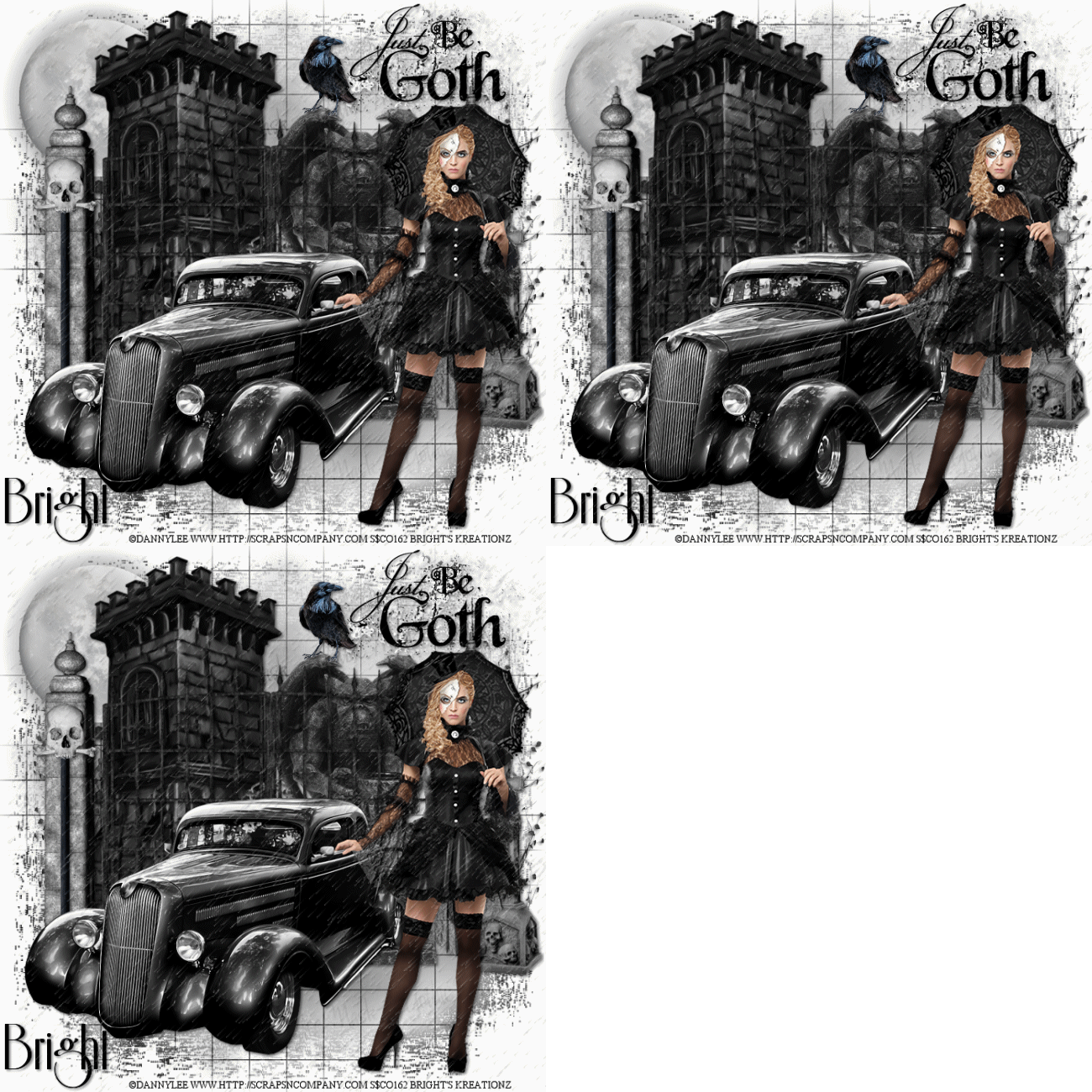
Raining Goth


Tube of choice,i used Danny Lee.
You need a licence to use this art,you can purchase one HERE.
Gothic Mask-Match for Danny Lee.Kit HERE.
BBD Mask_167.Thanks for sharing.HERE.
Rain animation HERE.
Font of choice i used Riesling.
Drop shaddow throughout.2.2.50.5.
File new 650x650.Fill with white.
Paste paper7as new layer.Mask new from image,select and apply mask,merge mask visable.
Paste Gothic branch right on top of mask,image mirror,drop shaddow.
Paste gargoyle on top center 0f mask,slightly to right.Drop shaddow.
Resize Headstone by70.Paste as new layer,on top bottom right of mask.Drop shaddow.
Resize Moon by75.Paste as new layer on top left of mask,drop shaddow.
Paste castle as new layer on top of moon and to left of gargoyle.Drop shaddow.
Resize wordart by70.Paste as new layer,on top right corner of mask,drop shaddow.
Resize gates by85.paste as new layer on top center of mask,slightly towards the bottom.Drop shaddow.
Resize Skull1 by75.Paste as new layer,on top center left of  
Resize crow by30.Paste as new layer 0n top left of gargoyle,drop shaddow.
Resize car by95.Paste as new layer bottom left on top all layers,Drop shaddow.
Resize tube by50,paste as new layer on top right tag.drop,sharpen.
Drop shaddow,erase small part of fingers so it looks like her fingers inside the car dorr window.
Add url copyright and licence number.
Add name bottom left of tag.Drop shaddow.
Edit copy merged,paste in animation shop as new animation.Duplicate twice.
Open animated rain.resiz 650 pixel hight.Edit select all,edit copy.
Highlight 1st.frame of tag.Edit select all,edit paste into selected frame.
Make sure rain is all over your tag.View animation.Save as.
Hope you enjoyed doing my tut,thanks for trying it.

Goth Girl


Tube of choice i used Freya Langford.
You need a licence to use this art,you can purchase one HERE.
PTU Little Girl Goth kit.HERE.
WSL _Mask83.Thanks for sharing.HERE.
Eye Candy gradient glow plugin.
Font of choice i used Rapscallion.
Drop shaddow throughout.2.2.50.5.
File 650x650,fill with white.
Resize paper34.by60.Paste as new layer,Mask new from image.
Select and apply mask,merge mask visable.
Resize Frame15.by 50.Paste as new layer on top center of mask.
Magic wand,click inside frame,Modify,exspand by5.
Resize paper10.Paste as new layer,Invert,Hit delete on keyboard.
Drag below frame,Sharpen then drop shaddow.
Resize tube by75,Paste as new layer,bottom center of frame.
Sharpen then drop shaddow.Used selection tool,cut overlapping 
of tube at bottom of frame.Drop shaddow frame.
Resize104 by10.Paste as new layer top right corner of arch
in paper frame fill,lower opacity just to see the covered arch by moon.
Use freehand tool point to point,draw around part of moon you do not want showing.
Edit cut.Now change opacity to70.
Resize2 by10.Paste as new layer on top left of moon,
Erase all but2 of the bats,Drop shaddow.
Resize17 by25.Paste as new layer,image mirror.
Place on top right corner of frame,Sharpen then drop shaddow.
Resize18 by30.Paste as new layer bottom left corner of frame.
Image mirror.Sharpen then drop shaddow.
Resize14 by15.Paste as new layer on top of18.Sharpen then drop shaddow.
Resize1 by25.Paste as new layer bottom right of30.
Sharpen then drop shaddow.
Resize81 by45.Paste as new layer top left corner of frame,Drop shaddow.
Resize11 by45.Paste as new layer below 81.Drop shaddow.
Resize30 by25.Paste as new layer below18.Sharpen then drop shaddow.
Resize21.by45.Paste as new layer bottom right of frame.Sharpen,drop shaddow.
Resize29 by30.Paste as new layer 0n top bottom roght of 21.Sharpen,drop shaddow.
Add url copyright and licence number.
Add name bottom right of tag.add EC gradient glow,colour Black halo on3.
Hope you enjoyed doing my tu,thanks for trying it.

Skull Goth


Tube of choice.I used Arthur Crowe.
Gothic Babe Pack with Kits.You need a licence to use this art.you can purchase one HERE.
BBD mask255.Thanks Babs for sharing.HERE.
Eye Candy gradient glow Black Halo.
Font of choice i used EasyLombardic Two.
Drop shaddow throughout.2.2.50.5.
File 650x650,fill with white.Change pallet colours.Foreground black,Backgtound light grey.
Hange fore ground to Linear gradient,Angle 320 5 repeats.
Mask new from image,select and apply mask,merge mask visable.
Resize22 by75.paste as new layer on top center of mask.Magic wand.
Click in center,modify exspand by5.resize paper1 by75.
Paste as new layer,invert,hit delete,drag below frame,Drop shaddow frame.
Resize tube of choice by60.Paste as new layer,on top center of frame.Drop shaddow.
Resize3.by55.Paste as new layer near top right of frame.Drop shaddow.
Resize28 by30 paste as new layer on top right of flower on 3,Sharpen,drop shaddow.
Resize1 by45.Paste as new layer,image mirror.Place bottom left of frame,
Drop shaddow.Rezise again by75.Duplicate move to side of original.
Resize4 by45,paste as new layer on top right of 1.Drop shaddow.
Resize5 by75.Paste as new layer top center of mask.Duplicate image flip.
Resize8 by45.Paste as new layer beneath 3.Rotate slightly,Drop shaddow.
Add url copyright and licence number.
Add name bottom right of tag.Add EC gradient glow,Colour black halo on 3.
Delete white background,save as PNG.
Hope you enjoyed doing my tut,thanks for trying it.

Red in black Goth


Tube of choice,i used Arthur Crowe.
Gothic Babe Pack with Kits.
You need a licence to use this art,you can purchase one HERE.
BBD mask167.Thanks Babs for sharing.HERE.
Simone New animations 451-455.Thanks for sharing.HERE.
Plugins.
Penta.com.Dot and cross.
Kang Houdini is only sleeping.
Font of choice i used Impact.Caps on.
Drop shaddow throughout.2.2.50.5.
File new 650x650,fill with white.
Copy and paste paper10 as new layer,Mask new from image,select and apply mask,
Merge mask visable,Add psp weave effect black.
Copy and paste 1 as a new layer,on top center of mask.Magic wand.
Click in center,modify exspand by5,resize paper8 by45,paste as new layer.
Invert hit delete,drag below frame.
Resize7 by75.paste as new layer with razer bottom left of frame.
invert hit delete.Drop shaddow.Select none,drop shaddow frame.
Resize tube of choice,paste as new layer,image mirror.
Paste as new layer on top center of frame,Sharpen,drop shaddow.
Resize8 by15.Paste as new layer on top right of flowers,sharpen,drop shaddow.
Resize13 by75.Paste as new layer on top right corner of frame.Drop shaddow.
Erase overlapping inside frame.Duplicate image mirror,move to align with original.
Duplicate image flip then mirror.
Resize20 by60.Paste as new layer.image rotate 90 degrees left.
Place down left side of frame,drop shaddow.
Resize13 by45.Paste as new layer,rotate right place down right of mask,
sharpen then drop shaddow,duplicate,image mirror,align to match original.
Add url copyright and licence number.
Add name below the feet of your tube,drop shaddow.Add Houdini is only sleeping.
Edit copy merged,paste as new animation in animation shop duplicate 15 times.
Open animation452,resize by75.Edit select all,edit select all copy.
Highlight 1st.frame of your tag,select all,paste in selected frame.
View animation,save as.
Hope you enjoyed doing my tut,thanks for trying it.